
Construction DPR Automation: Why Manual Daily Progress Reports Are Costing You Time
Every construction project runs on information. And the most underestimated document in that flow is the Daily Progress Report.
A DPR captures what happened today: work completed, materials consumed, labor deployed, equipment used, weather conditions, safety incidents, deviations from the plan. When done right, a daily progress report becomes the single source of truth for project managers, clients, and leadership teams making decisions worth crores.
Most developers we work with already have reporting systems in place. The problem is the format those reports live in - spreadsheets, PDFs, WhatsApp photos, handwritten registers. There is a persistent gap between what happened on site and what decision-makers actually see.
That gap costs time. In construction, time is money you never recover.
The Real Cost of Manual DPR Workflows
Let us be specific about what "manual" means in 2026. We are not talking about pen-and-paper registers (though those still exist on some sites). We are talking about the modern version of manual - where site engineers spend their evenings compiling data from multiple sources into a standardized DPR template, attaching photos, cross-referencing schedules, and emailing the report to three different stakeholders.
Here is what that actually looks like on a typical day:
- Data collection: 30-45 minutes walking the site, taking photos, noting quantities
- Compilation: 45-60 minutes entering data into Excel or a shared template
- Review and formatting: 20-30 minutes making it presentable for leadership
- Distribution: 10-15 minutes sending it to the right people with the right attachments
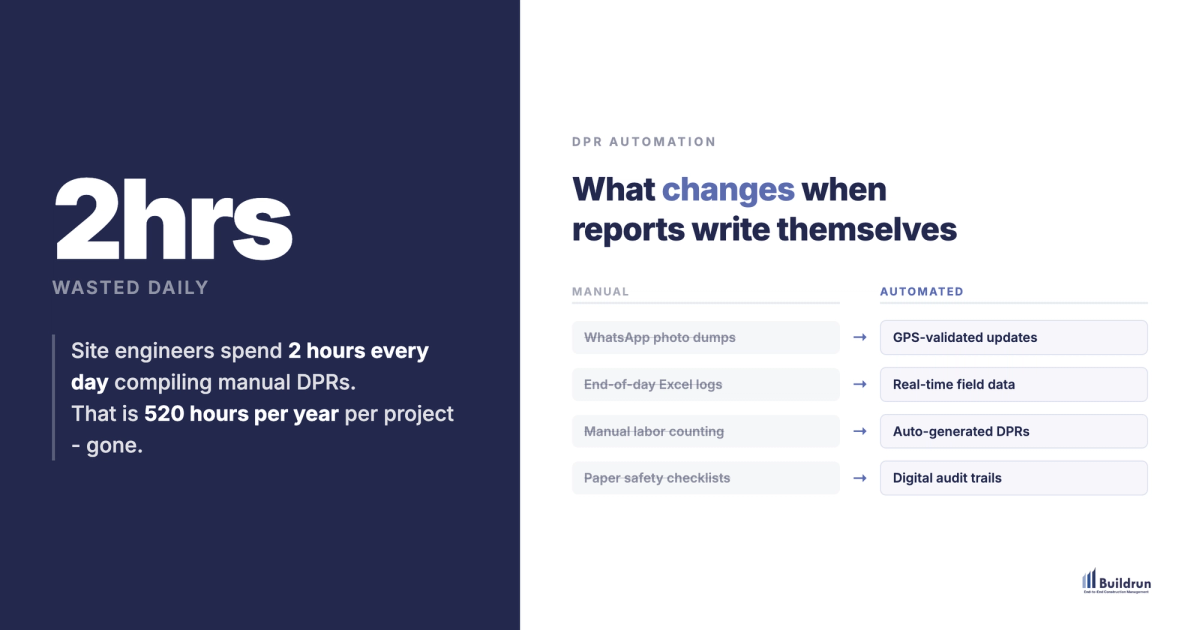
That is 2 to 2.5 hours of an engineer's day spent on documentation instead of engineering. Multiply that across 5 sites, 6 days a week, 52 weeks a year. The number gets uncomfortable fast.
And the worst part - after all that effort, the report is already outdated by the time it reaches the project manager's inbox the next morning.
What Breaks When DPRs Stay Manual
The hours lost are only the surface. The deeper cost shows up in places most teams do not measure.
Delayed decisions. A manual DPR often arrives 12-18 hours after the work it describes. If a concrete pour fell short of target yesterday, the project manager finds out today. That is one full day of compounding delay before anyone can respond.
Inconsistent data quality. When five different engineers across five sites fill out the same DPR template, you get five different interpretations of "percentage complete." One engineer estimates visually. Another measures precisely. A third copies yesterday's number and adds 2%. The data looks complete, but it is not comparable.
Lost institutional knowledge. When a DPR lives in an Excel file on someone's laptop, it disappears with that person. Six months later, when a client disputes a timeline or a contractor challenges a measurement, the evidence either does not exist or takes days to locate.
Invisible schedule drift. Without real-time progress data, small daily shortfalls - 5% less brickwork here, a half-day rebar delay there - compound silently. By the time the weekly review catches it, you are already two weeks behind.
What Automated DPR Actually Looks Like in the Field
Construction DPR automation does not replace engineers with software. It removes the repetitive parts of reporting so engineers can focus on what they were hired to do - build.
Here is how it works in practice with a platform like Buildrun:
Real-time data capture. Instead of collecting data at end-of-day, field teams log updates as work happens - directly from the site using a mobile interface. A concrete pour gets logged the moment it is complete, with GPS coordinates, timestamped photos, and quantity data attached automatically.
Auto-populated templates. The daily progress report software pulls data from multiple modules - scheduling, quality checklists, material logs, labor attendance - and assembles the DPR automatically. No copy-pasting between spreadsheets. No hunting for yesterday's photos in a WhatsApp group.
GPS-validated quality control. Every entry is tagged with location data. You can verify that the inspection photo was actually taken at Tower B, Floor 12 - not pulled from a gallery of old site photos. This builds an evidence trail that holds up under scrutiny.
Instant distribution. The moment a DPR is generated, it reaches every stakeholder who needs it - project managers, clients, consultants - in the format they prefer. No email chains. No "did you get my report?" follow-ups.
We have seen this workflow save teams hours every week on reporting across projects totaling 25M+ sq.ft. under management. That time goes back to supervision, coordination, and the actual work that moves a project forward.
What Changes When DPR Automation Is Running
Decision speed goes from days to hours
When progress data flows in real time, project managers can act the same day a deviation occurs. A shortfall in brickwork productivity at 2 PM can trigger a resource reallocation by 4 PM - instead of becoming a line item in tomorrow morning's report that gets discussed in next week's review meeting.
Consistent data across every site
Automated reporting standardizes how data is captured, measured, and presented. When every site uses the same construction documentation framework, you can compare Tower A's progress against Tower B with confidence - because the numbers mean the same thing.
Audit-ready documentation by default
Every automated DPR entry is timestamped, geotagged, and stored in a searchable archive. When RERA compliance reviews come up, when a client asks for a 6-month progress summary, or when a contractor disputes a measurement - the data is already organized and already verified.
Engineer retention gets easier
Young engineers do not leave companies because the work is hard. They leave because they spend a significant chunk of their day on data entry that feels pointless. Automating the repetitive parts of reporting makes the job feel like what they signed up for - actual construction management, not clerical work.
Client confidence without extra effort
When clients receive consistent, detailed, GPS-verified progress reports every single day without being asked - that builds trust faster than any quarterly review presentation. The report becomes a communication tool, not a compliance checkbox.
Contractor accountability tightens
With automated, timestamped records tied to specific locations, disputes over what was completed and when become simpler to resolve. The data speaks before anyone needs to argue.
How to Implement DPR Automation Without Disrupting Active Sites
Moving from manual to automated reporting does not require shutting down operations or retraining entire teams. Here is what we have seen work across large-scale residential and commercial projects:
Start with one site. Pick a project that is early enough in its lifecycle to benefit from full documentation coverage, but active enough to generate real data. Run the automated DPR workflow alongside the existing process for two weeks. Let the team see both outputs side by side.
Focus on the field team first. If site engineers find the mobile interface faster than their current process, adoption takes care of itself. The key is making data entry faster than the old way. If it feels like another system on top of existing ones, it will not stick.
Standardize your DPR template before automating. Automation magnifies whatever process you feed it. If your current DPR template captures 40 fields but only 15 matter for decisions, simplify first. A clean daily progress report template automated well beats a bloated one digitized poorly.
Connect reporting to scheduling. The real power of automated DPR shows up when progress data feeds directly into your project schedule. Instead of manually updating Gantt charts once a week, planned-vs-actual comparisons happen automatically, every day. Deviations surface before they become delays.
Where This Is Heading
The developers we work with have already moved past "reports as paperwork." For them, the DPR is a live data stream - it drives decisions, protects timelines, and builds accountability across every floor and every site.
At Buildrun, we built our automated reporting around one principle: the best report is the one that writes itself from real work happening on real sites. No extra effort. No end-of-day scramble. Accurate, verified, instant documentation - every single day.
If your site engineers are still spending their evenings compiling DPRs instead of planning tomorrow's work, it is worth seeing what the alternative looks like.
See how this works in practice
Buildrun gives construction teams live project data, automated scheduling, and real-time progress tracking - across every site, every day. See it working on a real project.